


Viber – Free Messaging and Calling Software for PC
Viber is a popular instant messaging application based on VoIP technology, widely loved and used by millions of users worldwide. Viber for PC supports text messaging, voice messages, video calls, file sharing, and more—completely free via the Internet.
Free, Secure Calls and Messages Anywhere
Viber features a massive collection of stickers, especially animated stickers that let users freely express their personality. The app is available on multiple platforms, including Windows, macOS, Linux, iOS, Android, and Windows Phone.
Viber Turns 15!
First launched in 2010, Viber has now reached its 15th anniversary. It started as a simple VoIP service for everyone, offering unlimited chat, voice calls, and video calls with reliable quality.
Over the past 15 years, Viber users have made trillions of free call minutes—an astonishing number equivalent to several million years of continuous calls.
Today, Viber has become a secure and trusted communication platform, handling billions of messages. Users can freely express themselves and share content in their own way.
Viber’s core philosophy is “Privacy First.” End-to-end encryption for private chats and calls has been enabled by default since 2016. In 2020, self-destructing messages were introduced for 1-on-1 conversations.
In the coming years, Viber will continue to evolve alongside 5G, AR, VR, and AI technologies to further enhance communication experiences.
Smart Messaging Features
Viber supports Quick Reply, allowing users to react to messages instantly using emojis such as Like, Dislike, Love, and more.
Viber for PC is one of the most popular free chat and calling applications in Vietnam. Recent updates include file sharing on PC, message reactions in group chats, and deleting messages directly within conversations.
On Windows, Viber offers features similar to Skype, including voice calls, video chats, and message synchronization across multiple devices.
Viber also offers versions optimized for Windows 8 and Windows 10 (Metro interface), available via the Microsoft Store.
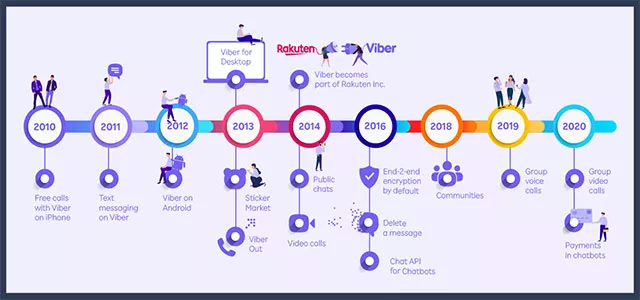
Viber: Free and secure video calls, messaging, and file sharing
Key Features of Viber for PC
- High-quality HD voice calls
- Video calling support
- Free messaging with text, images, and files
- Group chats
- No registration forms or passwords required
- Automatic sync of contacts and messages between phone and PC
- Seamless call transfer between devices
Viber synchronizes conversations across devices, helping you stay connected anytime, anywhere.
As a cross-platform application, Viber allows seamless switching between devices while preserving chat history.
Latest Viber Updates (02/2025)
New Message Reactions
Express yourself with new reaction emojis directly inside chats.
Community Comments
Threaded comments help keep conversations organized inside communities.
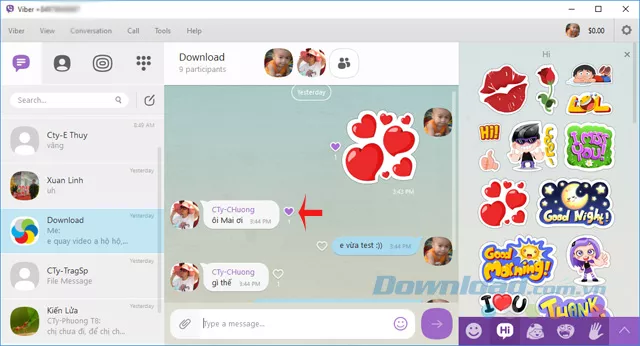
Free, secure video calls, messaging, and file transfers
Viber Plus – Enhanced Privacy
Read messages invisibly, hide online status, leave groups silently, and delete messages without leaving a trace.
AI Chat Summaries
AI automatically summarizes long conversations so you don’t miss important points.
Organize Chats with Folders
Group chats into folders such as Friends, Work, or Study for better organization.
How to Delete Chat History on Viber (PC)
Method 1
Open the conversation → Conversation > Delete Conversation → Confirm Delete.
Method 2
Right-click a chat in the list → Delete Conversation → Confirm.
How to Download Stickers on Viber PC
Stickers are synced from your phone account. Simply sync Viber PC with your mobile device.
Using Emojis on Viber PC
The updated interface allows easy emoji management, hiding, reordering, and customization.
Viber for PC Review
Viber for PC is easy to use and ideal for free calls and messaging across all devices.
Pros
- High-quality HD video calls
- Free messaging
- Large sticker collection
- Stable performance
Cons
- Requires an Internet connection













Reviews
There are no reviews yet.