


Download 1Password for Mac 7 Free – A Popular Tool for Storing Passwords and Sensitive Data
Overview of 1Password for Mac – Password Manager for macOS
1Password for Mac is a popular tool designed to securely store usernames, passwords, credit cards, addresses, notes, bank accounts, driver’s licenses, passports, and much more behind a single Master Password, protected with end-to-end encryption. The built-in password generator allows users to create strong, unique passwords as well as easy-to-remember passphrases.
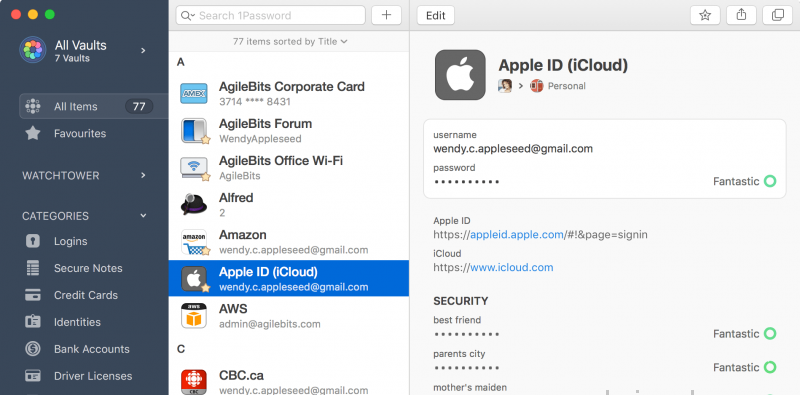
The latest version of this well-known password manager is a major update, introducing dozens of new features and improvements. These include a redesigned, collapsible dark-themed sidebar that makes navigating and managing password vaults easier than ever. The refreshed design extends across the lock screen, login icons, cards, item pop-up windows, and more. In addition, a new custom font, Courier Prime Bits by Alan Dague-Greene, improves readability when viewing passwords.
Key Features of 1Password for macOS
- Every pixel has been carefully refined and polished for maximum visual and usability improvements.
- The new Pop-Out feature allows you to open an item in a separate window and keep it easily accessible.
- Secure notes are now displayed using Markdown formatting.
- Quick Open lets you jump instantly to items or vaults and can be found in the File menu.
- A custom password font designed specifically for clarity, courtesy of Alan Dague-Greene.
- A new password strength meter to help you evaluate security at a glance.
- Touch ID now leverages your Mac’s Secure Enclave, making authentication more secure than ever.
- Login items now display beautiful, customized icons by default.
- Remove duplicate items within each vault via Help > Tools > Clean Up Duplicate Items.
- Spotlight integration allows you to search your 1Password items directly using Apple’s built-in search tool.
- Nested tags help improve organization – add tags with “/” and 1Password will automatically group them.
- Optional automatic updates ensure you always stay up to date with the latest features and fixes.
System Requirements
-
macOS 10.12 or later
-
64-bit system












Reviews
There are no reviews yet.