


WebSSH is a versatile networking tool designed for iPhone and iPad users who need secure remote server access. Whether you’re a system administrator, developer, or tech enthusiast, this app allows you to connect to remote systems using protocols like SSH, Telnet, and SFTP right from your iOS device.
With support for multiple connection types and a user-friendly interface, this tool makes it easy to manage servers, transfer files, and run commands without needing a computer. Let’s break down its main features from this article from igsnap.
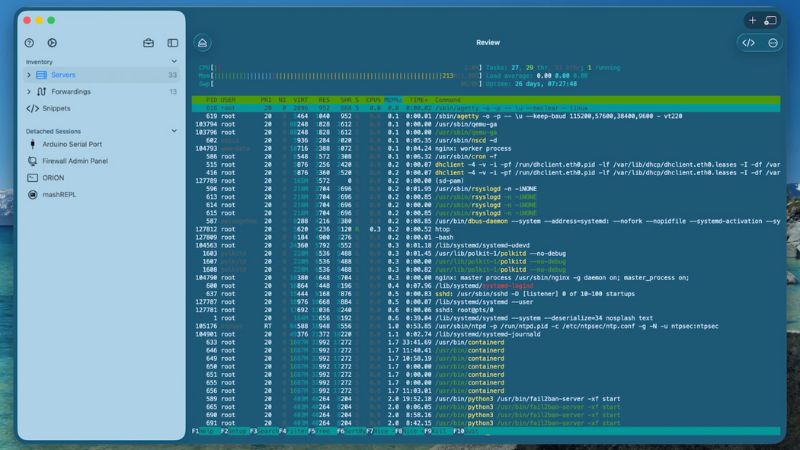
Powerful Remote Access on Your iPhone
Using WebSSH, you can establish secure connections to remote machines wherever you are. By leveraging SSH (Secure Shell), the app ensures that your communication with servers remains encrypted and safe. This makes it ideal for managing web servers, network devices, and other remote systems directly from your mobile device.
Core Features of WebSSH
To understand how WebSSH supports remote server management on iOS, let’s take a closer look at its main capabilities.
- Secure Shell (SSH) Support: WebSSH enables encrypted access to remote servers so you can execute commands securely.
- Telnet Connectivity: For systems that rely on older protocols, Telnet support allows you to connect efficiently when SSH isn’t enabled.
- SFTP File Transfers: Move files between your mobile device and a server using SFTP, providing you with a reliable way to upload, download, and manage documents on remote systems.
- Multiple Session Management: You can maintain several active connections at once, making it convenient to switch between servers without reconnecting.
- Command History and Autocomplete: Typed commands are stored in history for quick reuse, and autocompletion helps speed up input while reducing errors.
- Customizable Keyboard and Themes: The app offers specialized keyboard layouts and theme options to make terminal work comfortable on smaller screens.
Ideal for On-the-Go Professionals
WebSSH – SSH, Telnet, SFTP Client for iOS is tailored toward IT professionals and users who regularly perform remote tasks. Whether you’re troubleshooting remote systems, deploying updates, or transferring files, the app brings terminal functionality to your pocket with minimal setup.
The ability to handle multiple protocols and work across different systems makes WebSSH useful not only for seasoned developers but also for anyone learning network administration.
Seamless Integration and Workflow
With support for Quick Connect, saved profiles, and password or key-based authentication, the app streamlines your remote access process. You can quickly resume previous sessions, store frequently used servers, and manage login credentials securely within the app.
This combination of convenience and robust network tools makes WebSSH one of the more complete SSH/SFTP clients available on iOS.











Reviews
There are no reviews yet.