


Calligraphy Font Collection
The Calligraphy Font Collection is a free Vietnamese artistic calligraphy font set, ideal for writing traditional Lunar New Year couplets just like a professional calligrapher (Ông Đồ). With this calligraphy font collection, you can freely create your own unique couplets or design creative and eye-catching images featuring artistic lettering.
As the Lunar New Year approaches, in addition to downloading Tet-themed wallpapers, you can also design your own Tet 2021 wallpapers using calligraphy fonts to express your personal style and creativity.
Note
In Microsoft Word, some calligraphy fonts may not display the lower parts of characters such as g, y, q correctly because their descenders are longer than usual. However, when printed, the characters appear perfectly correct, so you can rest assured.
The Calligraphy Font Collection includes many different calligraphy styles, allowing you to freely choose the font that best matches your preferred aesthetic. Each font is carefully crafted, showcasing elegance and sophistication in every stroke, with a balanced contrast between thin and bold lines to achieve high artistic value.
Key Features of the Calligraphy Font Collection
- High aesthetic value: Soft, flowing strokes create a captivating visual appeal.
- Strong message expression: Express emotions and artistic intent more effectively than standard fonts.
- Uniqueness and individuality: Each font reflects a distinct artistic personality.
- Evokes emotion and nostalgia: Creates elegance, romance, and a classic feel.
- Wide variety of styles: Suitable for many design purposes.
- Free to use: Most fonts are completely free.
- Handwritten appearance: Closely resembles authentic calligraphy.
- High compatibility: Supports Vietnamese input methods.
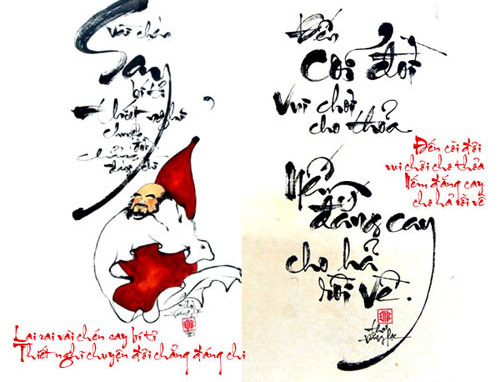
Calligraphy font set
About Calligraphy
Calligraphy refers to the art of beautiful handwriting. It is not just a writing style but an artistic expression, where each character is considered a visual artwork.
This Calligraphy Font Collection includes diverse decorative characters, making it ideal for typography lovers, greeting card design, and creative artwork. Once installed, the fonts can be used in applications such as Microsoft Word, CorelDRAW, and Adobe Photoshop.
How to Install Fonts on Your System
Method 1
After downloading and extracting the font folder, select all fonts using Ctrl + A, or select individual fonts while holding Ctrl. Right-click and choose Install.
Method 2
Copy the desired fonts using Ctrl + C, then paste them into the following folder:
C:\Windows\FontsUse Ctrl + V or right-click and select Paste.
Frequently Asked Questions About Calligraphy Fonts
What is a calligraphy font?
A calligraphy font mimics artistic handwritten lettering, often inspired by East Asian styles. These fonts are commonly used for Tet designs, Vietnamese calligraphy, greeting cards, and decorative artwork.
Do calligraphy fonts support Vietnamese?
Some calligraphy fonts fully support Vietnamese characters and diacritics, while others may only support English or lack full accent compatibility.
Which software supports calligraphy fonts?
- Microsoft Word, Excel, PowerPoint
- Adobe Photoshop, Illustrator, CorelDRAW
- Canva (with Pro account upload)
- Other design software supporting custom fonts
Can calligraphy fonts be used for printing?
Yes, as long as the font is vector-based, supports Unicode, and displays correctly on printers.
Will calligraphy fonts cause issues when sharing Word files?
If the recipient does not have the font installed, the document may display incorrectly.
Solutions:
- Convert the file to PDF before sharing
- Include the font file for installation













Reviews
There are no reviews yet.