


TreeSize Free – Analyze Disk Usage and Free Up Valuable Space
Over time, no matter how large your hard drive is, storage needs continue to grow. TreeSize Free helps you reclaim valuable disk space.
TreeSize Free can be launched directly from the context menu by right-clicking a folder or drive. It shows the size of the selected folder, including all subfolders, in an Explorer-like interface with detailed file-level information.
The tool also includes the NTFS Ratio feature, allowing you to view NTFS compression ratios and apply NTFS compression to entire folder branches.
Key Features of TreeSize Free
Find Junk Files – Clean Up Disk Space
- Breaks down disk usage by file and folder hierarchy.
- Uses a tree map visualization to illustrate disk space usage.
- Scans network shares and cloud drives.
- Displays folder sizes with color-coded bars for easy navigation.
- Shows compressed files in LZX and XPress formats along with NTFS compression ratios.
- Allows NTFS compression for entire folder branches.
Access Storage Management Anytime
- Launch directly from a folder or drive context menu.
- Run with administrator privileges to scan protected files safely.
Quickly scan folder sizes TreeSize Free
Free Up Space on Smartphones and Mobile Devices
- Scans smartphones and mobile devices via MTP and WebDAV.
Quick File Overview
- Displays detailed columns such as size, allocated space, number of files, last access time, and owner.
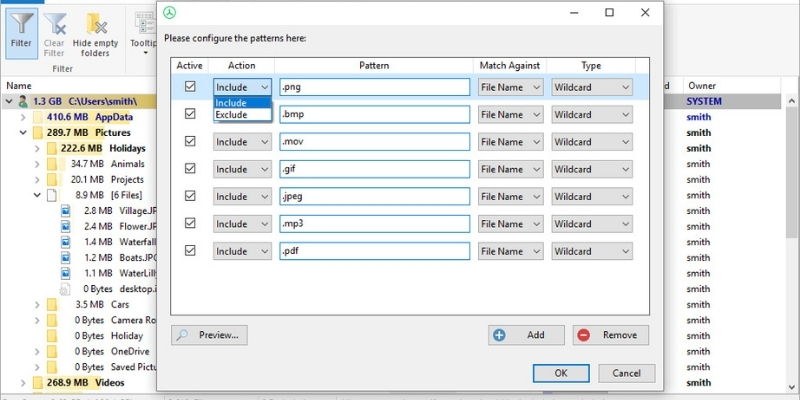
- Filter results using wildcards, regular expressions, or name-based filters.
- Preview filters before applying them.
- Switch between simplified and detailed views and print results.
- Supports an intuitive touch interface on Windows 8 and later.
Small, Fast, and Secure
- Uses the Master File Table (MFT) for extremely fast NTFS drive scanning.
- Lightweight and can run directly from a USB drive.
- Supports U3 installation for portable usage.
Upgrade to TreeSize Professional
Discover advanced capabilities available in TreeSize Professional:
Advanced Charts and Statistics
- Gain deeper insights into disk usage.
- View statistics by file type and file owner.
- Top 100 list shows the largest files.
- Compare disk usage growth over time.
- Includes extended toolbars and pie charts.
Export Reports and Charts
- Export statistics and charts in multiple formats.
- Create PDF reports or export to Excel.
Custom File Search
- Search files using multiple criteria.
- Perform batch actions such as move, copy, save, or rename.
TreeSize is available in three versions:
- TreeSize Free
- TreeSize Personal
- TreeSize Professional
Paid versions offer free trial versions.

Upgrade to TreeSize Professional
Latest TreeSize Free Update
TreeSize Free 4.7.3 (Updated May 7, 2024)
- Fixed bold highlight issue for large files and folders.
- Optimized column widths in exported PDF files.
- Fixed rare UI freezing issue.
- No longer supports Windows Server (upgrade to TreeSize Professional required).












Reviews
There are no reviews yet.