


For many Mac users, organizing content between a computer and an iPhone can feel awkward. Apple’s ecosystem works beautifully in most scenarios but still puts limits on how easily you can back up photos, transfer files, or explore what’s inside your device’s storage. iTools for Mac steps in as a practical bridge – a toolkit that brings clarity and control to device management without needless complexity.
Instead of wrestling with restrictive menus or half-hidden features, iTools presents a clear, intuitive interface that makes tasks like syncing media, exploring files, and backing up data feel deliberate and straightforward. Whether you are preparing to upgrade your phone, declutter your music library, or simply safeguard precious memories, this app provides a thoughtful suite of capabilities that feels purposeful.
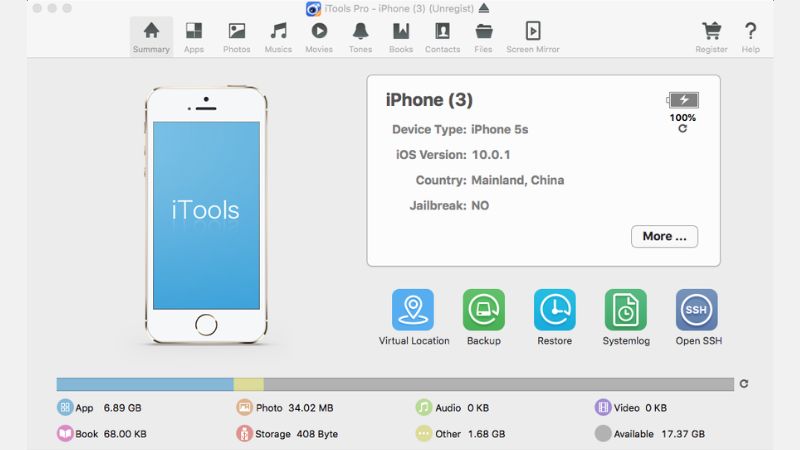
What Is iTools for Mac?
iTools for Mac is a device management application designed to work with iOS and iPadOS devices through a Mac computer. It allows users to connect an iPhone or iPad and perform detailed content and system management that goes beyond what Finder or iTunes alone can offer.
Once connected, you can browse the device’s contents, export photos and videos, back up apps, manage contacts, organize ringtones, and explore storage in a way that feels organized rather than overwhelming.
Unlike cloud-only solutions, every process takes place on your Mac and keeps your data where you can see it and control it. This gives a sense of ownership and transparency that many users find reassuring.
A Closer Look at Its Core Features
iTools brings together several tools under one roof, each designed to make everyday tasks easier and more flexible:
Media Management
Photos, videos, music, and voice memos are all easy to view, sort, and transfer. You can export high-resolution photos directly to your Mac, add music without syncing playlists, and organize media the way you prefer.
This is especially useful for users who store large media collections on their devices and want a quick way to manage them without relying on cloud services.
Backup and Restore
Backing up your device becomes more transparent with iTools for Mac. Instead of depending on automated cloud backups, you can create local copies of essential data on your Mac. When you need to restore content after an update or move to a new device, the process feels clear and under your control.
Contact and Message Tools
iTools lets you export and organize contacts, messages, and call logs. You can save them in different formats for backup or reference, which is particularly helpful for users who need to archive communication history or keep records for work.
File Explorer
The built-in file explorer opens up access to your device’s storage in ways that Apple’s own tools don’t always allow. You can view folders, inspect file sizes, and move content with simple drag-and-drop actions. This makes finding and retrieving files easier and more precise.
Ringtone and App Management
Create custom ringtones from your favorite tracks and install them directly on your iPhone without third-party scripts or convoluted steps. App management also becomes more direct, giving you options to export app data or archive content as needed.
Who Will Benefit Most from iTools?
This app is well suited to users who want more visibility and flexibility in how they manage their iOS devices:
- Users with large photo libraries or media collections
- People who prefer local backups over cloud methods
- Anyone who wants a clearer view of their device’s storage
- Users who need to toggle content between Mac and iPhone without hassle
Casual users will appreciate the straightforward workflows, while power users will value the detail and control iTools offers.
Why It Stands Out
What sets the alternative apart is its commitment to clarity without sacrificing capability. Many device management apps attempt to hide complexity behind oversimplified interfaces or lock features unless you subscribe to heavy-handed plans. iTools, on the other hand, feels intentional. Its features are clearly labeled, tasks are easy to initiate, and results are easy to interpret.
The experience is less about automation and more about control with clarity — giving users meaningful options with understandable outcomes.
Final Thoughts
iTools for Mac reimagines device management by putting transparency and user choice at the forefront. It turns everyday tasks like transferring media, backing up data, or organizing files into processes that feel direct and intentional. For anyone who has ever struggled with restrictive device menus or confusing sync tools, this app offers a refreshing alternative that feels practical without being overcomplicated.
Whether you are preparing a new device, organizing an archive, or simply keeping your data safe and accessible, iTools gives you smart tools and a clear path forward.















Reviews
There are no reviews yet.