


Free Download Manager – Powerful and Free Download Accelerator
Free Download Manager (FDM) is a powerful download acceleration and management application. Similar to other popular tools such as Internet Download Manager (IDM) or EagleGet, this download manager is completely free. Notably, it also allows users to download YouTube videos easily, making it a favorite choice for many users.
What Is Free Download Manager?
Free Download Manager is software designed to increase download speeds and resume interrupted downloads. FDM accelerates downloads by splitting files into multiple parts and downloading them simultaneously, which can increase download speed by up to 600% or more.
In addition, the software can resume failed or paused downloads, so users do not have to restart downloads from scratch after an interruption.
Supported Protocols: HTTP / FTP / BitTorrent
Free Download Manager supports downloading files and even entire websites from any server using HTTP, HTTPS, and FTP protocols. Users can also download files using the BitTorrent protocol, making FDM a versatile all-in-one download solution.
Safe and Secure Download Experience
FDM provides a safer download environment by integrating community-based file reviews. Users can read feedback from other community members about a file before downloading it, as well as leave their own comments after downloading.
This feature helps warn users about potentially harmful or ineffective files, significantly reducing the risk of malware.
Open Source Under GNU General Public License
Free Download Manager is open-source software distributed under the GNU General Public License (GPL). This ensures transparency, security, and continuous improvement from the global developer community.
Additional Features of Free Download Manager
Beyond basic download acceleration, Free Download Manager offers many advanced features, including bandwidth control, download scheduling, video downloading from streaming websites, full website downloading using HTML Spider, and even remote usage over the internet.
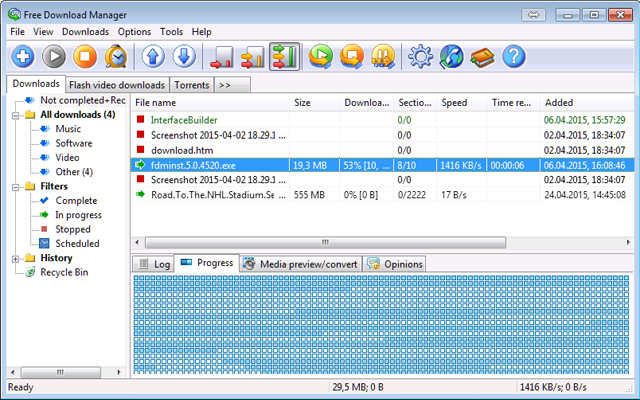
Download the Latest Version of Free Download Manager
The latest versions of Free Download Manager include support for RTSP and MMS downloads, automatic saving of download history, and improved browser integration.
Recent updates also include:
- Automatic update support for Firefox extensions
- Traffic usage reduction during browser activity
- Compatibility fixes with Internet Explorer 10
- Various bug fixes and stability improvements
Key Features of Free Download Manager
BitTorrent Support
Download files efficiently using the BitTorrent protocol directly within FDM.
Remote Download Management
Create new downloads or monitor active and completed downloads remotely via an internet connection.
Portable Mode
Users can create a portable version of Free Download Manager to use on multiple computers without installation or configuration.
Improved Video and Audio Support
Preview video and audio files before downloads complete, and convert file formats after downloading.
Completely Free and Secure
Free Download Manager is 100% free, open-source, and safe to use.
Download Acceleration
By splitting files into multiple segments and downloading them simultaneously, FDM maximizes download speed regardless of connection type.
Resume Broken Downloads
If a download is interrupted, FDM resumes from where it stopped, saving time and bandwidth.
Smart File Management and Scheduling
Organize downloaded files by type, move them to predefined folders, and use an intelligent scheduler to start or stop downloads automatically or perform actions such as shutting down the system.
Bandwidth Control
Users can adjust bandwidth usage to browse the web and download files simultaneously without network congestion.
Accelerate downloads and support file downloading
Site Explorer
Browse a website’s directory structure and selectively download files or folders.
HTML Spider
Download entire web pages or even complete websites, with customizable file extension filters.
Multi-Mirror Downloading
Download files simultaneously from multiple mirrors to improve speed and reliability.
Partial ZIP File Download
Download only selected parts of large ZIP archives instead of the entire file.
Community-Based Malware Protection
Users can view community feedback directly in the software, helping ensure that downloaded files are free from spyware and adware.
Multi-Language Support
Free Download Manager is available in 30 languages, including English, Vietnamese, French, German, Spanish, Chinese, Arabic, Korean, Russian, and many others.
Latest Update: Free Download Manager 6.22
The latest version of Free Download Manager (6.22) introduces several improvements:
- Added a Details tab for viewing Torrent content information
- Enhanced command-line support for faster download and upload operations
- Minor UI improvements for a smoother user experience
- Fixed issues with incorrect file names when downloading via HTTP
- Resolved bugs related to direct download sessions
- Fixed missing HTTP referer headers in some browser downloads
- Improved startup download process
- Fixed random crashes during torrent downloads
- Addressed issues with file selection in open file dialogs
- Other minor bug fixes and performance improvements

















Reviews
There are no reviews yet.