


For anyone learning the inner workings of computer networks, there is a gap between theory and practice. Reading about routers, switches, and topology diagrams builds understanding, but there is nothing quite like testing a setup firsthand. Cisco Packet Tracer fills that gap with a virtual networking environment that lets students, aspiring network professionals, and educators build and experiment with network designs in real time.
This tool, developed by Cisco Systems with education in mind, provides a dynamic simulation platform. Instead of setting up physical hardware in a lab, users can replicate complex network scenarios on a computer, interact with devices, and observe real behavior without risk of equipment damage or costly mistakes.
What Is Cisco Packet Tracer?
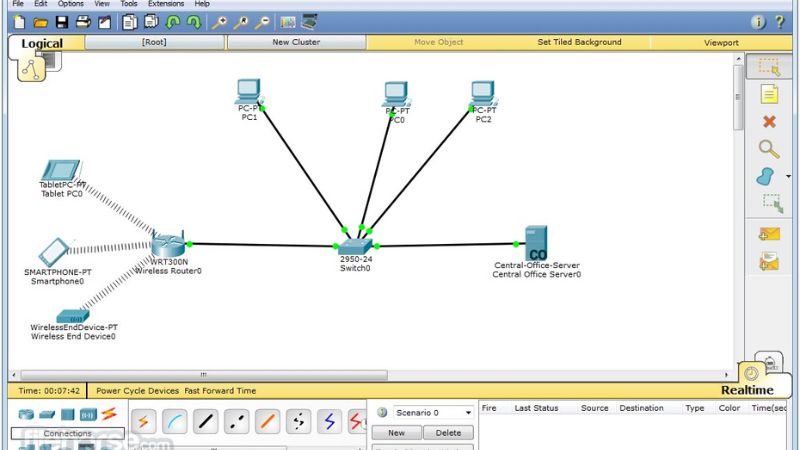
Cisco is an interactive network simulation application that places a range of virtual devices at your fingertips. Think of it as a sandbox for networking where you can drag and drop routers, switches, firewalls, and end hosts, link them together, configure settings, and then watch how data flows through the system.
Unlike static diagrams or textbook examples, Packet Tracer provides live feedback. You see the results of your configuration in motion, packets traveling, LEDs blinking, and connections showing activity. This makes it especially useful for learners preparing for Cisco certifications such as CCNA or for instructors building labs around real networking concepts.
Packet Tracer supports multiple operating systems and offers features that extend beyond simple layout: scripting, simulated IoT devices, and assessments that integrate directly with learning pathways.
Why Cisco Packet Tracer Matters
Networking is inherently practical. Skills like configuring VLANs, troubleshooting routing loops, or securing traffic can seem abstract until you apply them. Packet Tracer bridges that gap by offering:
- A realistic environment for exploring protocols and behaviors
- Support for a broad range of Cisco devices and IOS commands
- Opportunities to build, test, break, and rebuild networks safely
- Immediate visual feedback that reinforces learning
The value here is not only in building a network but in witnessing how changes at one point affect the entire system. Packet Tracer encourages experimentation, which cements understanding and develops intuition.
Key Features and Capabilities
Cisco Packet Tracer includes many elements that make it a versatile tool for learners and educators alike:
Device Palette and Drag-and-Drop Design
The user interface gives a broad palette of network components. From basic hubs and switches to advanced routers and wireless access points, you can place devices onto a canvas and connect them using intuitive controls.
Realistic Command Line Interface
Virtual devices in Packet Tracer accept real Cisco IOS commands. This means you practice exactly how you would on physical hardware. There is no middleman syntax or watered-down input; what you type on Packet Tracer resembles what you would use on actual equipment.
Simulation and Visualization
Packet Tracer shows you animated packet flow, interface statuses, and routing table updates. Seeing an ICMP echo request travel from one host to another or watching a routing protocol converge brings concepts to life.
Learning Activities and Assessments
The tool supports structured lab exercises and activities that can be assigned by instructors. Some versions integrate with curriculum systems, allowing students to complete tasks and receive guided feedback.
Cross-Platform Compatibility
Whether on a Mac, PC, or Linux machine, Packet Tracer runs smoothly. This ensures that learners can practice on the platform that best suits their needs without being locked into a specific operating system.
Who Should Use Cisco Packet Tracer?
Cisco Packet Tracer is especially valuable for:
- Students preparing for Cisco networking certifications
- Instructors designing network labs without physical equipment
- IT beginners seeking to understand how networks operate in practice
- Professional network engineers prototyping designs before deployment
Even seasoned professionals find Packet Tracer useful for quick experimentation and proof-of-concept ideas before moving into physical testbeds.
Getting Started
Using Cisco Packet Tracer begins with a simple installation. Once installed, users open a blank canvas and start placing devices. You connect them with virtual cables, configure interfaces, assign IP addresses, and begin issuing commands in built-in terminal windows. The real-time results give immediate feedback, making learning more engaging and effective.
The learning curve is gentle for basic setups, yet deep enough to challenge even advanced users who want to explore complex topologies and protocol interactions.
Final Thoughts
Cisco is more than a simulator. It is a learning engine that turns abstract networking concepts into visible, interactive experiences. In an industry where hands-on skills matter, Packet Tracer helps learners transition from theory to competency without the barrier of expensive hardware investments.
For students, educators, and professionals alike, it offers a rare blend of realism and accessibility that nurtures understanding and builds confidence. Whether beginning your journey into networking or sharpening existing skills, Packet Tracer provides a place to build, test, and grow.
















Reviews
There are no reviews yet.