


File Repair – Fix Corrupted Files and Restore Data
It can be a real nightmare when you suddenly cannot open a file containing important data and only receive error messages, no matter which software you try to use.
Some common reasons why files become corrupted and cannot be opened include:
- Power supply issues or unstable electricity while a file is being opened.
- Unstable Internet connections during file downloads.
- Virus infections that damage files.
- Errors during file sharing or receiving files over the Internet.
- Application errors when opening, editing, or saving files.
- Many other possible causes that lead to file corruption.
Among these, virus attacks and unstable power supply are two of the most common reasons files become corrupted and unusable.
Common Symptoms of Corrupted Files
Typical issues include files not being recognized with the correct format, inability to read files, failure to open files with different software, or memory-related error messages. In these situations, File Repair can be a lifesaver.
About File Repair
File Repair is a free software tool designed to help repair corrupted files. It supports a wide range of file formats, including:
Supported File Formats
- Word documents: DOC, DOCX, DOCM, RTF, PDF
- Excel files: XLS, XLA, XLSX
- PowerPoint files: PPT, PPS, PPTX
- Access databases: MDB, MDE, ACCDB, ACCDE
- Compressed files: ZIP, RAR
- Video files: AVI, MP4, MOV, FLV, WMV, ASF, MPG
- Audio files: MP3, WAV
- Image files: JPEG, GIF, TIFF, BMP, PNG, RAW
How to Use File Repair
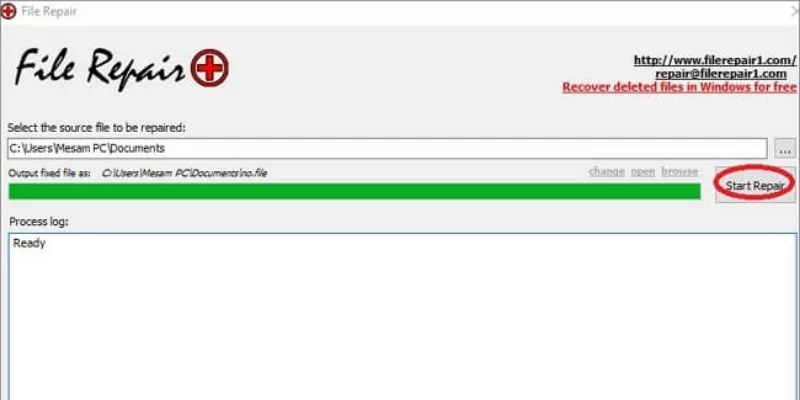
From the main interface, click the “…” button and select the file you want to repair.
Click Start Repair to scan for errors and repair the file. The process is fast, and once completed, try opening the repaired file.
If the file still shows errors, you can send the corrupted file to
[email protected]
to request further assistance from the software author.














Reviews
There are no reviews yet.