

Transferring files between an Android phone and a Mac has long been more complicated than it should be. While Android devices are ubiquitous, macOS does not natively offer deep support for them, forcing users to rely on cloud drives, email attachments, or third-party tricks that break at the worst possible moments. MacDroid changes that by offering a direct, reliable link between Android devices and Mac computers.
Instead of wrestling with Bluetooth limitations or jumping between apps, Mac Droid lets you treat your Android device as if it were an external drive. Photos, videos, documents, and entire folders become accessible without cloud uploads or hidden menus. It brings simplicity back to a task that has been needlessly frustrating for years.
What Is MacDroid?
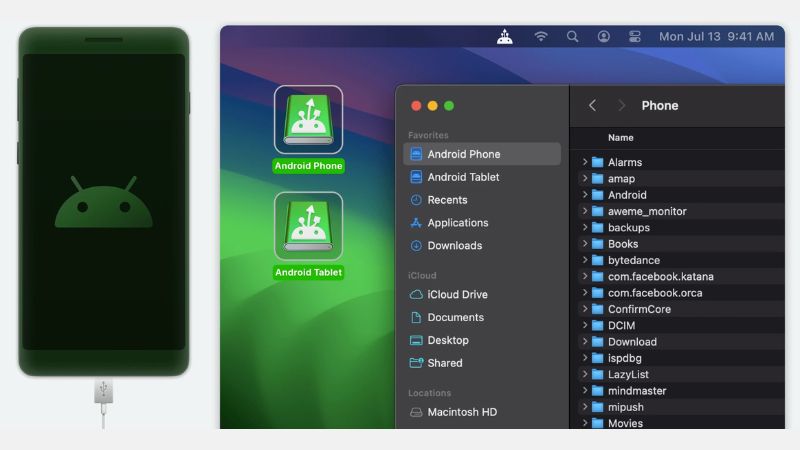
MacDroid is a utility for macOS that enables straightforward file transfer and management between Mac computers and Android devices. Once installed and connected, your phone’s internal storage and removable SD cards appear in Finder just like any other drive.
This unlocks a file management experience that feels familiar and immediate. You can drag and drop items, organize folders, and browse content without network delays or complicated sync procedures. MacDroid for Mac does not just copy files — it bridges ecosystems in a way that respects each platform’s strengths.
Why MacDroid Matters
At its core, MacDroid solves a problem many Mac users with Android phones know too well: friction. Traditional methods of moving content are slow, indirect, or restricted by platform boundaries. The tool turns that around by:
- Making Android devices visible in Finder
- Supporting both internal storage and external SD cards
- Allowing one-way or two-way file transfer
- Letting you work directly with files instead of hidden caches
By giving you direct access to your device’s file system, this app removes the guesswork and limitations that come with email, cloud storage, or intermediary apps.
Key Features of MacDroid
MacDroid streamlines interactions that used to feel like hacks into something intuitive and dependable.
Native Finder Integration
With MacDroid, your connected Android device shows up in Finder. This means you use Mac’s built-in file browser to explore, copy, rename, and organize content just like you would with a USB drive.
No app windows to juggle, no menus buried in subpanels. It feels like the Mac and Android are finally speaking the same language.
Two-Way Transfers
Whether you want to copy photos from your phone to your Mac for editing, or send large files back to your device for travel or playback, this app supports both directions. This flexibility removes the need for separate apps based on use case.
Support for SD Cards
Many Android users expand storage with SD cards. The alternative honors this reality by giving you access to both internal and removable storage in one view. You can move files across storage locations without workaround tools.
Drag and Drop Simplicity
No sync queues, no conversion steps, no hidden upload processes. Just drag and drop. If you prefer keyboard shortcuts or context menus, Finder supports those too. All common file actions work as expected.
Secure and Local
MacDroid does not depend on internet connections or intermediary servers. Everything happens locally over the USB cable you already carry. This makes transfers not only faster but more private.
Who Will Benefit Most from MacDroid?
This app is especially valuable for:
- Users who take photos and videos on Android and want them on a Mac immediately
- Students and professionals who exchange documents between devices
- Creators working on audio, video, or graphic projects that span mobile and desktop
- Anyone frustrated by cloud upload limits or slow wireless transfer tools
If you have ever waited for photos to sync or tried to fish files out of hidden folders, the tool feels like a breath of fresh air.
Why MacDroid Stands Out
What distinguishes this app from other transfer tools is its focus on experience rather than novelty. It does not bombard you with features you will never use. Instead, it does one thing well: it makes your Android device accessible as a storage partner for your Mac.
This design clarity is rare. Most utilities either overpromise with half-baked extras or lock essential features behind confusing menus. MacDroid’s clean workflow means less time learning a tool and more time getting things done.
Final Thoughts
MacDroid rethinks how macOS and Android should interact. By making file access direct, intuitive, and fast, it removes barriers that have frustrated users for years. Whether you are moving a handful of photos or organizing gigabytes of media, this tool turns what used to feel like a chore into an effortless task.
For anyone who wants a no-nonsense way to connect Android storage to a Mac, MacDroid for Mac delivers with elegance, practicality, and confidence.

















Reviews
There are no reviews yet.