

For developers, thinkers, and anyone daring to solve problems with code, the creative process often swings between moments of inspiration and persistent friction. Learning new languages, debugging logic, or translating ideas into functioning software can be exhilarating and exhausting in equal measure. Codex for Mac steps into this space with an ambitious goal: to make coding feel less like wrestling with syntax and more like having a conversation with a collaborator.
Unlike conventional text editors or code runners, Codex app brings AI-powered assistance directly into the developer’s environment on macOS. It functions as a partner in thought, suggesting solutions, clarifying intent, and offering context-aware snippets that accelerate productivity without sacrificing control.
What Is Codex for Mac?
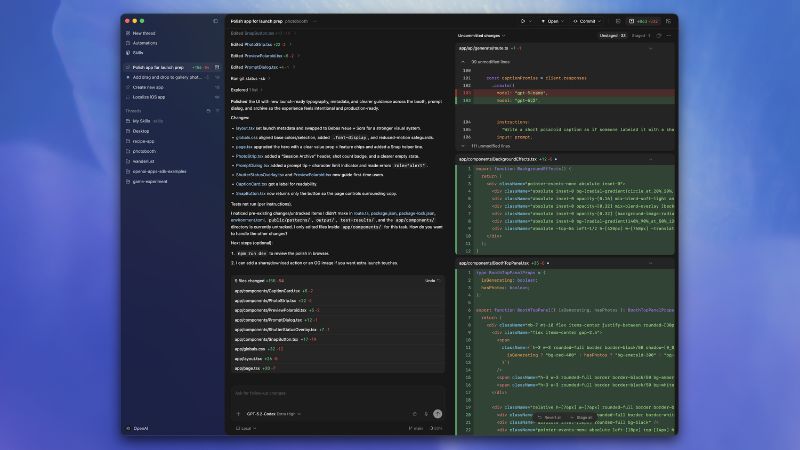
Codex is an advanced coding assistant built to interpret natural language and map it to working code. Its Mac application integrates with your workflow to help write, review, and refine software across diverse programming languages and toolchains.
While traditional IDE plugins provide autocomplete or syntax highlighting, this app takes a step further. It understands meaning, not just characters. You can describe the logic you want to implement, and the assistant can generate scaffolding or even complete functions that reflect that description.
This transforms coding from a purely manual task into a collaborative experience where ideas can be expressed in plain language and translated into executable code.
A Creative Boost for Developers
Anyone who has stared at an empty editor screen knows the quiet pressure of beginning a new project. Codex alleviates this feeling by lowering the inertia between thought and execution.
You can draft functions by describing what they should accomplish rather than typing every line by hand. Complex library usage becomes less intimidating when you can ask the assistant to show correct patterns. Error interpretation becomes less cryptic when Codex provides contextual explanations and suggestions.
These capacities make this tool especially valuable not only for seasoned developers but also for learners navigating unfamiliar concepts.
How Codex Enhances Coding Workflows
OpenAI’s Codex App for macOS does not replace your editor or your programming instincts. Instead, it enriches them in concrete ways.
Natural Language to Code
By interpreting written descriptions, Codex can generate code that aligns with your intent. Instead of searching documentation or examples, you can focus on what you want to build.
Smart Refactoring Support
When revisiting old code or restructuring existing projects, this software can suggest cleaner patterns, more efficient logic, or improved readability within the context of your current workspace.
Explaining Tough Concepts
Learning a new framework or tackling a tricky algorithm often requires external help. Codex can fill that gap by explaining what code does and why it behaves a certain way, right where you need the insight.
Multi-Language Fluency
Codex is not limited to a single language ecosystem. Whether you write Python, JavaScript, Ruby, or shell scripts, it can help interpret and generate relevant code patterns, making cross-language experimentation less intimidating.
Who Will Benefit Most from Codex?
The Codex app appeals to a broad range of users, from learners to professionals.
Students and newcomers can bridge the gap between concept and implementation. Independent developers can sketch out ideas and iterate rapidly. Professionals in collaborative teams can align documentation, intention, and execution more efficiently.
Its presence directly within macOS offers the comfort of local tooling without the disjointed experience of constant tab switching.
A New Kind of Coding Partner
What sets Codex apart is not raw automation or generative novelty. It is the thoughtful way it complements human thinking. The tool acknowledges that programming is both intellectual and creative, sometimes messy, often nuanced, and always personal.
Instead of prescribing one correct way to code, the tool respects your context and offers suggestions that accelerate progress while still honoring your design and style choices.
Final Thoughts
Codex for Mac represents a shift in how we frame coding tools. It is not a replacement for human insight, intuition, or problem-solving. Rather, it is a partner that lightens cognitive load, bridges gaps in knowledge, and supports developers as they turn ideas into real software.
For anyone who wants to explore coding with less friction and more confidence, Codex invites a fresh conversation between intention and execution, one that feels intuitive, powerful, and collaborative.











Reviews
There are no reviews yet.